
57/hr
Views per hour
How fast a video is getting views right now. A high number means people are watching it today, not just last year.
You'll see it next to every video in search, on your home feed and on channel pages.
VidLyft is a free Chrome extension. It adds a few simple numbers to YouTube, so you can see what's working before you make your next video.
One click from the Chrome Web Store. Free, on any computer with Chrome.
Search for anything, open a video, a channel or a Short. Nothing new to learn.
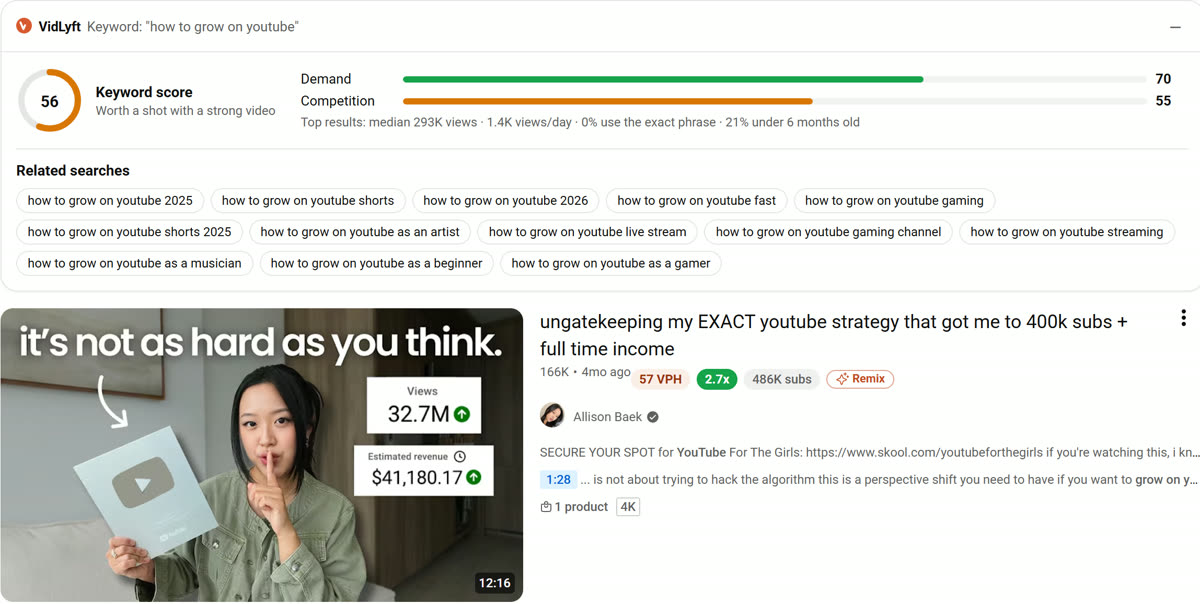
VidLyft adds small labels and panels right on the page: how fast each video is growing, and how much better it's doing than usual.
Four numbers do most of the work. Here's each one in plain words, on a real YouTube page.
How fast a video is getting views right now. A high number means people are watching it today, not just last year.
You'll see it next to every video in search, on your home feed and on channel pages.
How this video did compared with the channel's usual videos. 2.7× means it got about 2.7 times the normal views. That's a topic worth copying.
Warm 1.5× · Hot 3× · Fire 10× · Mega 50×
How good a search term is to make a video about, out of 100. It weighs how many people search for it against how hard the competition is.
Shows above the results every time you search YouTube.
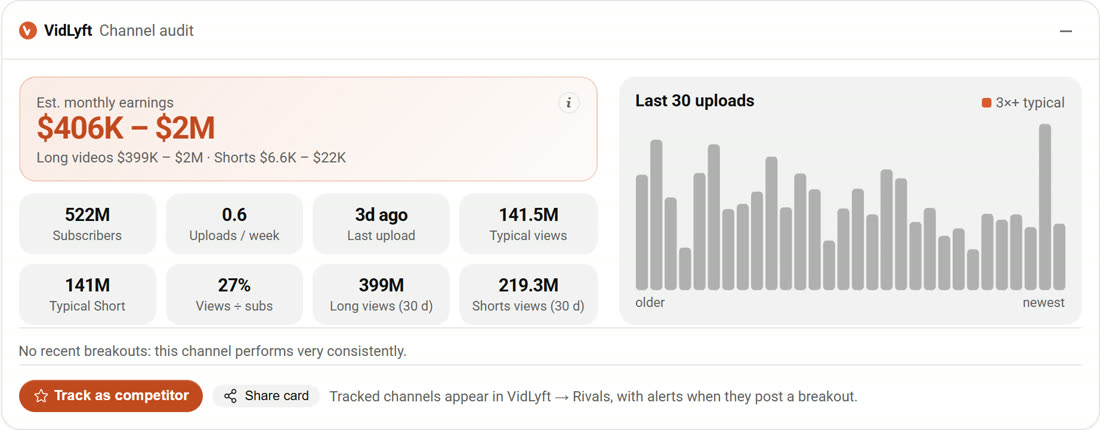
About how much a channel makes a month from ads, worked out from its public views and typical ad rates for its niche. It's an estimate, not their real bank statement.
Example: MrBeast's channel page, captured Oct 2026.
Type the title of your next video. VidLyft's title grader scores it out of 100 and tells you what to fix. It runs in your browser, so nothing is sent anywhere.
It only shows up on YouTube pages you already use. You can fold panels away or hide the Shorts card.
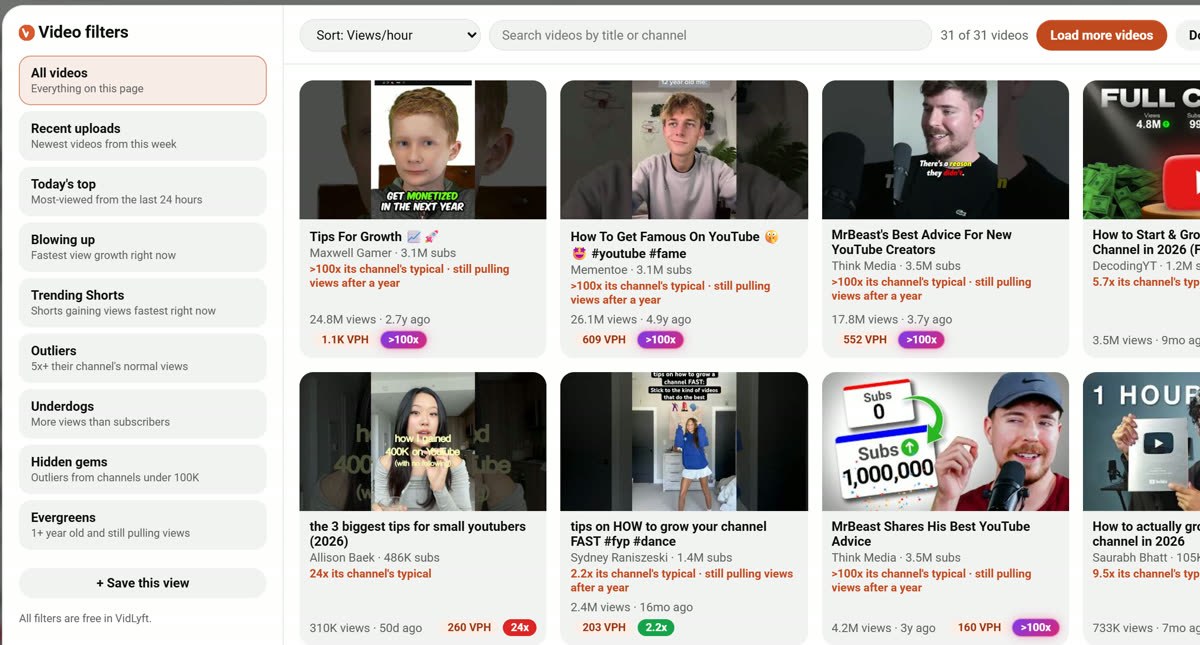
A keyword score above the results, plus views per hour and a breakout score on every video. Filters let you sort a page by what's blowing up.
Estimated monthly earnings, a chart of recent uploads and their breakout videos.
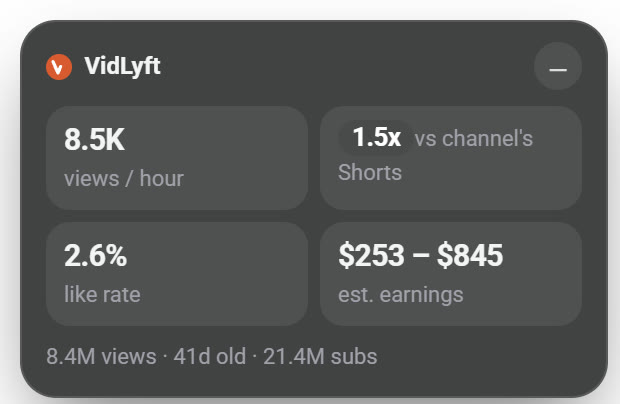
Views per hour, breakout score, like rate and estimated earnings on the Shorts player.
In the VidLyft button next to your address bar: a title A/B grader, a Shorts hook checker, a chapters maker and an upload checklist. Sign in with Google for AI titles that score 90+.
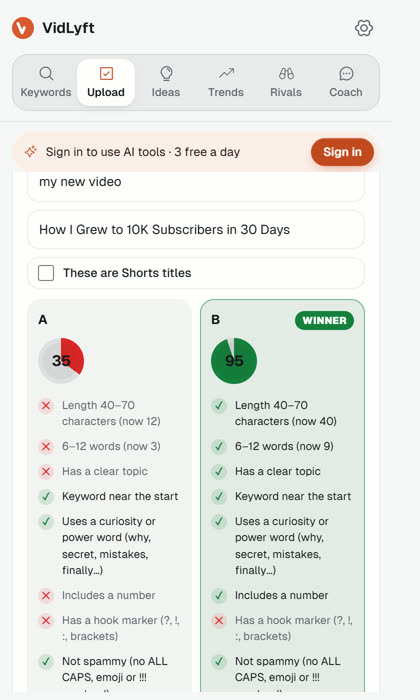
The free plan is the full tool. Pro is only for people who want a lot more AI help.
Upgrade inside the extension after you add it.
Yes. Every core tool is free with no time limit, including 3 AI requests a day. Pro ($14.00 a month) only adds more AI requests.
No. VidLyft works on any YouTube page without connecting your channel. You only sign in with Google if you want to use the AI tools, and that shares just your name, email and profile picture.
No. It's a Chrome extension, so it works in Chrome on a computer. On a phone, enter your email at the top of this page and we'll send you the link for later.
They're estimates. VidLyft works them out from a channel's public views and typical ad rates for that kind of content, and always shows a range. Views, likes and subscribers come straight from YouTube.
Pro is free for your first 3 days. A card is required to start. When the trial ends you're charged $14.00 a month unless you cancel first: open the VidLyft button, go to the gear tab and click "Manage subscription". One trial per account.
Yes. Panels fold away, the Shorts card has a hide button, and you can change settings in the VidLyft button next to your address bar.
No. VidLyft is an independent tool. YouTube is a trademark of Google LLC.