See the numbers YouTube hides.

Views per hour, outlier scores, channel earnings and AI titles that score 90+, right inside YouTube. A free Chrome extension for creators.
youtube.com
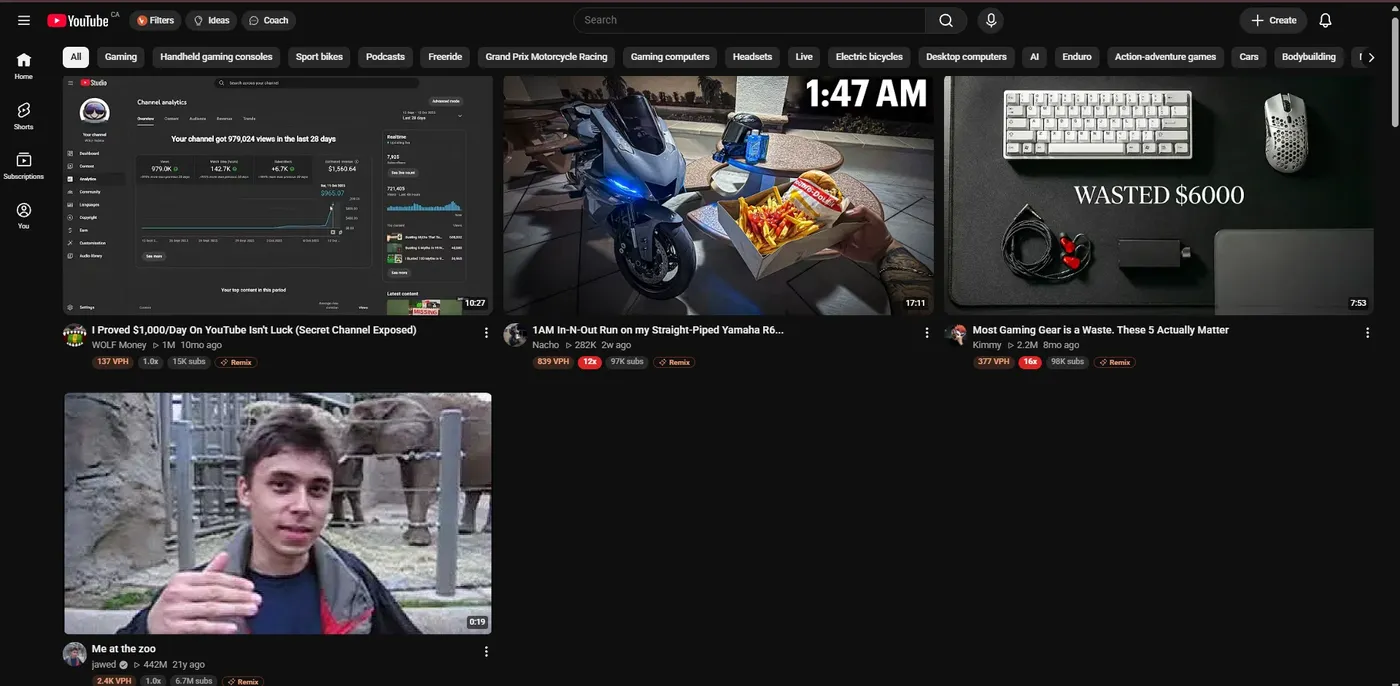
YouTube home feed with VidLyft badges under every video: views per hour, an outlier score like 16x, and subscriber count HIDDEN HIDDEN HIDDEN
A YouTube video card with VidLyft badges: 377 views per hour and a red 16x outlier score

Try it now · nothing to install

Grade your next title. Live.

The same title rules VidLyft uses inside YouTube Studio, running right here in your browser. Type a title and watch the score move.

    0out of 100

    Want titles that score 90+ without the guesswork? VidLyft writes them from your script inside YouTube Studio, and grades every one.

    Add to Chrome

    Channel earnings

    How much does MrBeast make a month?

    Open any channel and VidLyft estimates its monthly YouTube earnings. Works on every channel, including your competitors.

    Est. monthly earnings

    $374K–$1.9M

    • MrBeast$374K–$1.9M
    • Marques Brownlee$64K–$319K
    • Mark Rober$28K–$140K

    Estimates from views on each channel’s last 30 days of uploads at typical YouTube pay rates ($1–$5 per 1,000 views). Not their real bank accounts, and sponsors aren’t included. Captured October 17, 2026.
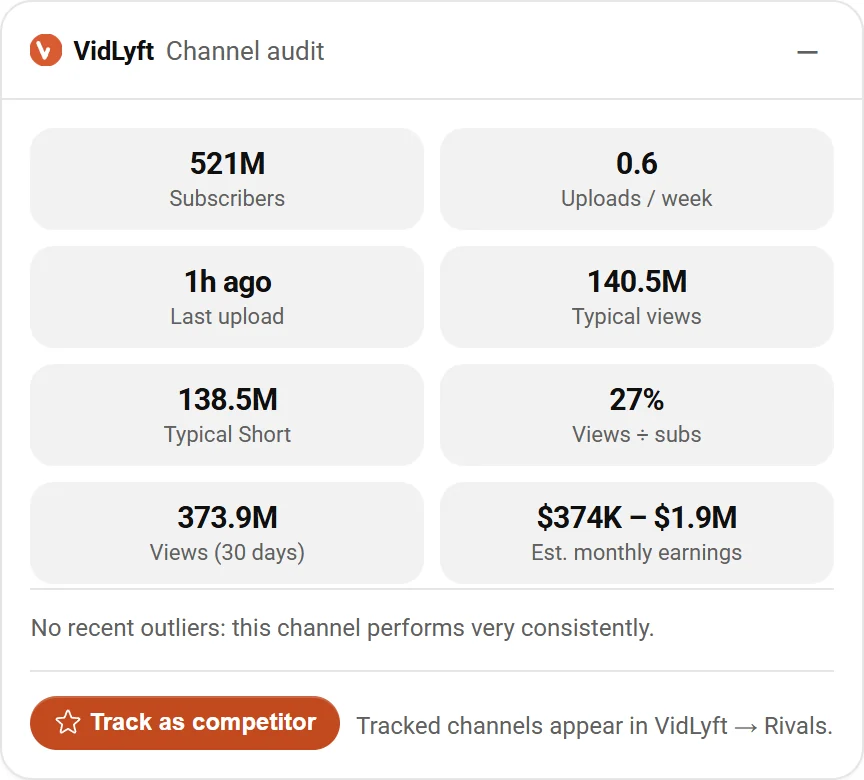
    VidLyft Channel audit panel for MrBeast
    The real VidLyft panel on the channel page.

    What should I post?

    Let YouTube tell you.

    VidLyft puts a badge on every video, so you can see which topics are beating their channel right now, then turn them into ideas for yours.

    Step 1 · The red badge
    1×

    This video got 16× its channel’s normal views.

    That’s an outlier. When a video beats its own channel by that much, people want that topic right now.

    Step 2 · Blowing up

    Sort YouTube by what’s exploding today.

    Open Filters on any page and pick “Blowing up”. Videos re-sort by how fast they’re getting views right now.

    Step 3 · Hidden gems

    Small channels. Huge views.

    This one has 2.5K subscribers and 1.9M views. Proof you don’t need a big channel, you need the right idea.

    Step 4 · Remix

    Turn a winner into your next idea.

    Hit Remix on any video and VidLyft turns it into fresh video ideas for your own channel.

    Step 1 · The red badge

    16× its channel’s normal views

    An outlier: people want that topic right now.

    Video card with a red 16x VidLyft outlier badge

    Step 2 · Blowing up

    Sort by what’s exploding today

    Filters → “Blowing up” re-sorts any page by views per hour.
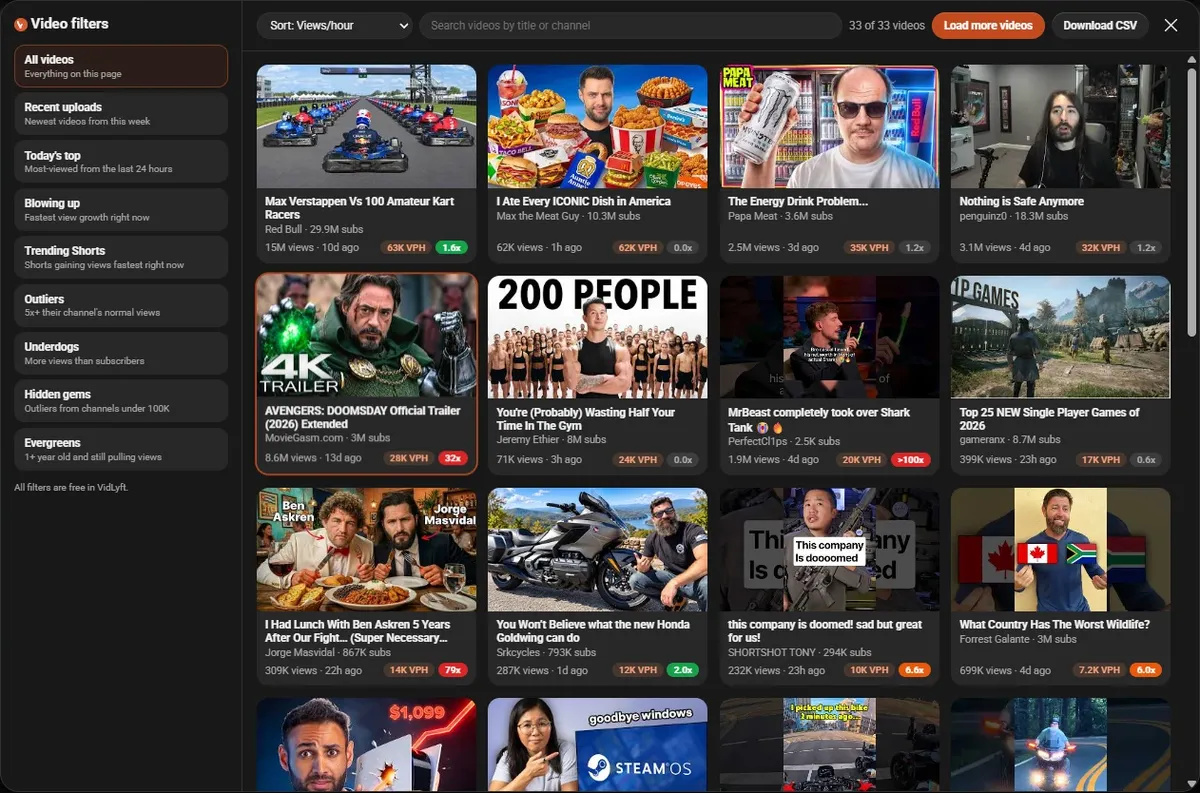
    VidLyft Filters panel with presets like Blowing up and Hidden gems

    Step 3 · Hidden gems

    Small channels, huge views

    2.5K subscribers, 1.9M views. You need the right idea, not a big channel.

    Step 4 · Remix

    Turn a winner into your idea

    Remix turns any video into fresh ideas for your channel.

    Inside YouTube Studio

    Your next title, graded before you post.

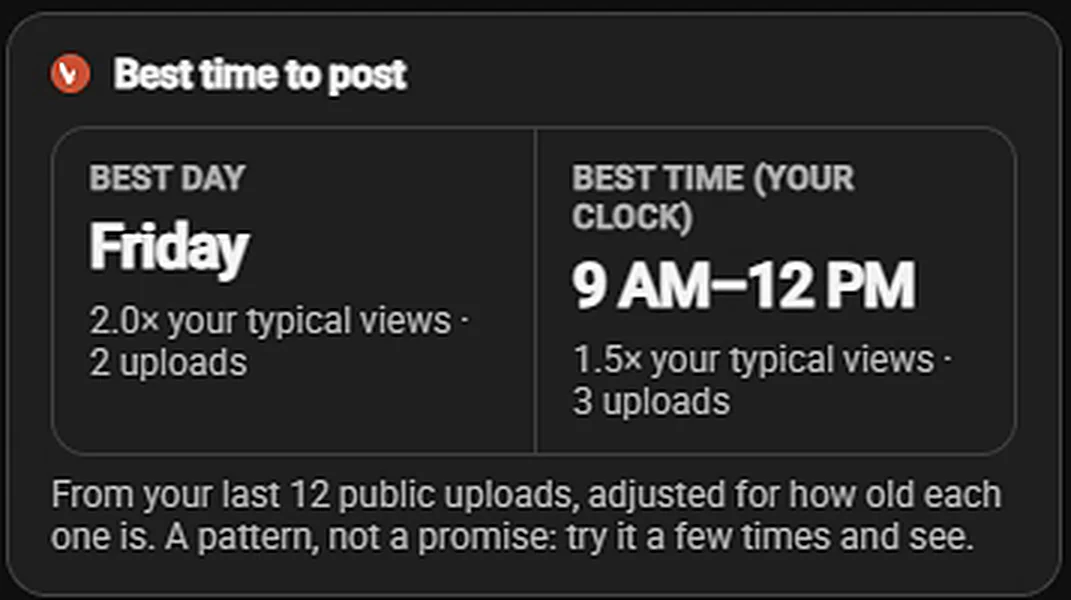
    Paste your script. VidLyft writes titles from what you actually say, scores every one, and shows your best time to post, learned from your own uploads.
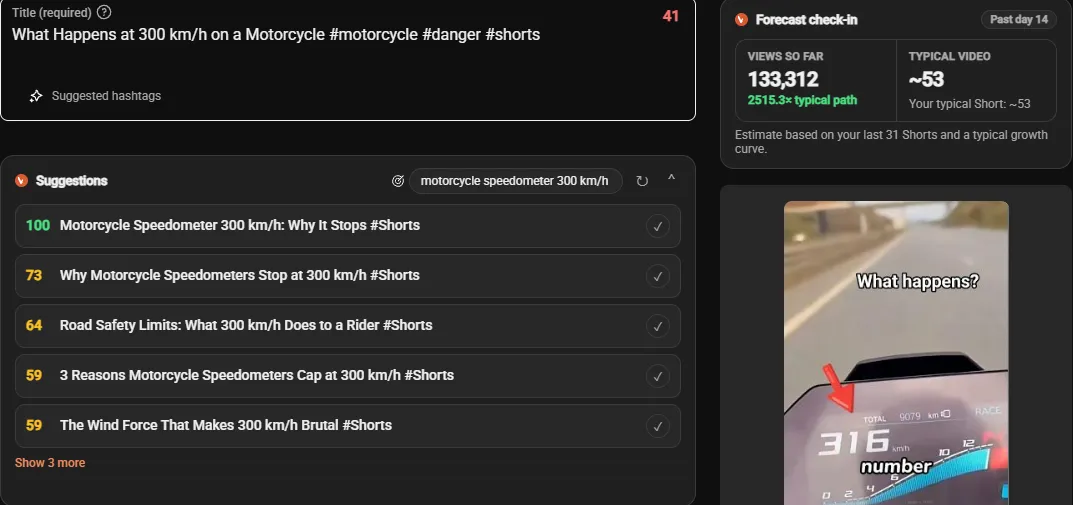
    YouTube Studio with five VidLyft AI title suggestions scored 100, 73, 64, 59 and 59, next to a forecast check-in
    VidLyft best time to post card: Friday, 9 AM to 12 PM, from the channel's last 12 public uploads

    Watch it in 30 seconds

    See VidLyft in action.

    Voiceover is AI-generated.

    Everything else

    Every tool a growing channel needs.

    Research on every YouTube page, writing tools inside Studio, and a popup one click away.

    Keyword research

    Demand vs competition for any search, plus the related searches people actually type.

    Views per hour

    Live, on every video.

    Channel audit

    Upload rhythm, typical views and earnings for any channel.

    Magic Fill

    Title, description and tags from your script in one click.

    Thumbnail ideas

    Concepts built from what your video is about.

    Comment replies

    Reply drafts right in YouTube Studio, in your voice.

    AI coach

    Ask anything about growing your channel and get an answer for your niche.

    Pricing

    Start free. Upgrade for more AI.

    Free

    $0 forever
    No card needed.
    • Views per hour & outlier badges everywhere
    • SEO, title & description scores
    • Keyword research, filters & CSV export
    • Channel audits, earnings & rival tracking
    • 3 AI requests a day (titles, ideas, Coach and more)
    Add to Chrome

    Pro

    $14.00 / month
    Taxes included. 3-day free trial, then billed monthly. Cancel anytime.
    • Everything in Free
    • 1,000 AI requests a month
    • AI titles, descriptions, tags & scripts
    • Magic Fill, thumbnail ideas & comment replies
    • Smarter AI coach, 200 messages a month
    Add to Chrome

    Questions

    Anything else? Email support@vidlyft.com.

    Is VidLyft affiliated with YouTube or Google?
    No. VidLyft is an independent tool. YouTube is a trademark of Google LLC.
    Do I need to give VidLyft access to my YouTube account?
    No. Signing in with Google only shares your name, email and profile picture so we can keep track of your plan. The free tools work without signing in at all.
    How does the free trial work?
    Pro is free for your first 3 days (100 AI requests included). A card is required to start. When the trial ends you’re charged $14.00/month automatically, unless you cancel before then in the VidLyft popup: open the gear tab and click “Manage subscription”. One trial per account.
    How do I cancel Pro?
    Open the VidLyft popup, go to the gear tab and click “Manage subscription”. You keep Pro until the end of the period you paid for.
    How accurate are the numbers?
    Views, likes and subscribers come straight from YouTube. Keyword demand, earnings and forecasts are estimates based on public data and are labelled as estimates.

    Stop guessing.
    Start seeing.

    Add to Chrome
    On your phone?

    Get VidLyft on your computer

    Chrome extensions install on a computer, not a phone. We’ll email you the link so it’s waiting for you.

    We only use your email to send the link (and tips, if you tick the box). See our privacy policy.